Contact Support
 Sign In
Domain Control Validation (DCV) is a required step to prove you own a domain before an SSL certificate can be issued. Hosted.com® uses DCV to ensure that SSL certificates are only provided to legitimate domain owners, protecting both your website and visitors. Completing DCV is quick and can be done through several verification methods.
TABLE OF CONTENTS
What is Domain Control Validation (DCV)?
DCV is a process used by Certificate Authorities (CAs) to confirm that the person requesting an SSL certificate has control over the domain. This verification prevents unauthorized issuance of SSL certificates, which could compromise security. Once DCV is successfully completed, your SSL certificate can be issued and installed on your Hosted.com® hosting account.
Why Complete DCV?
Completing DCV is necessary because:
- It verifies that you are the legitimate owner of the domain.
- It allows the SSL certificate to be issued and installed correctly.
- It ensures your website visitors see a secure HTTPS connection.
- It protects against fraudulent SSL issuance that could compromise your website security.
How to Complete Domain Control Validation
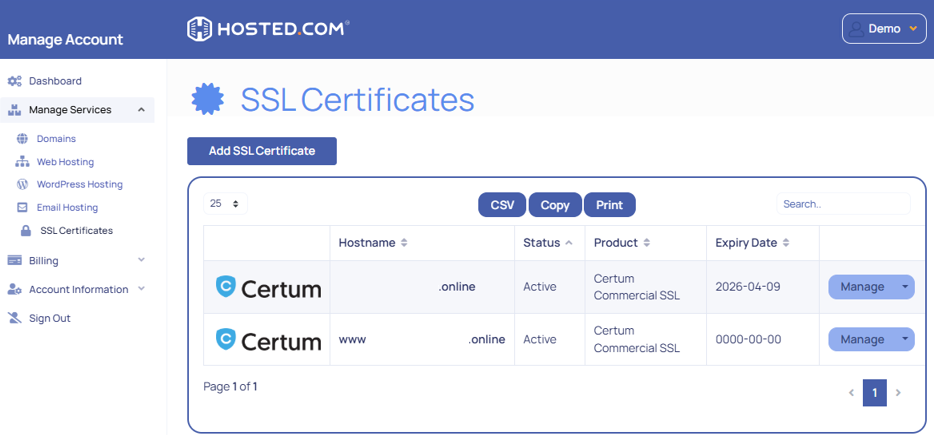
1. Login to your Hosted.com® account.
2. Go to the Manage Services dropdown menu, click SSL Certificates, then click Manage next to your SSL certificate order.
Receive an Email for DCV
3. Check your email for a request from the SSL provider (usually Sectigo or DigiCert). The email contains instructions for one or more Domain Control Validation Method methods.
Choose a Domain Control Validation Method
4. Choose one of the following Domain Control Validation Method methods offered:
- Email Validation: Confirm domain control by clicking a unique verification link sent to an authorised email address (e.g., admin@yourdomain.com).
- DNS Validation: Add a specific TXT record to your domain’s DNS settings in the Hosted.com® DNS manager or your external DNS provider.
- HTTP File Upload: Upload a provided verification file to a specific folder (/.well-known/pki-validation/) on your website’s root directory via cPanel File Manager or FTP.
How to Setup a DCV – Domain Control Validation Method
5. Complete the selected validation method as instructed:
- For email, check your inbox and follow the verification link.
- For DNS, log in to your Hosted.com® DNS manager, add the TXT record exactly as given, then save changes.
- For HTTP file upload, upload the file to the specified directory, then confirm the upload via the SSL provider’s interface.
6. Once validated, the SSL certificate issuance process will continue automatically.
How to Track a DCV
7. You can track your SSL status in your Hosted.com® account dashboard under Services > Manage SSL.
Additional Information
- Verification Timing: Email-based Domain Control Validation typically completes within a few minutes, while DNS- or HTTP-based methods may take longer. DNS changes may often require up to 24–48 hours to fully propagate across the internet.
- Multi-Domain Certificates: If your SSL certificate includes multiple domains or subdomains, you’ll need to complete validation for each one. Skipping a domain can prevent the certificate from being issued.
- DNS Verification Requirements: For DNS-based DCV, ensure your domain is using Hosted.com® nameservers or that you have access to update DNS records with your provider. Incorrect DNS settings are a common cause of delays.
- Troubleshooting DCV Failures: If validation doesn’t pass, verify that:
- The verification email address exists and is accessible.
- Any TXT records are added exactly as provided.
- Files for HTTP validation are uploaded to the correct public directory.
- If issues persist, Hosted.com® support can guide you through fixing the problem.
- Security Best Practices: Always complete Domain Control Validation through official channels. Use only authorized email addresses (e.g., admin@yourdomain.com) and ensure DNS access is secure to prevent fraudulent certificate requests.
- Revalidation on Renewal: Some SSL renewals may require repeating DCV, especially for Domain Validated (DV) certificates, so be prepared to go through the process again.
- Monitoring Status: You can track the status of your DCV in your Hosted.com® dashboard. This helps you confirm when validation is complete and the certificate is ready to install.