


 Contact Support
 Sign In
A resume website is your personal space online where you showcase your skills, experience, and projects. Unlike a paper CV or LinkedIn profile, it’s dynamic, interactive, and fully customizable. Here, with the help of a Website Builder, you decide how your story looks and how others experience it.
In 2025, creative resume websites are more important than ever for standing out. With job markets so competitive, a unique website helps you stand out. It doesn’t just list your work; it shows your personality, style, and the value you bring.
The benefits are clear. A resume website builds trust, improves your visibility in search results, and gives you full control over updates. It’s a powerful way to shape your professional brand.
This guide provides inspiring real-world resume website examples and creative styles you can learn from. You’ll also get simple tips to create a resume website that leaves a lasting impression.
KEY TAKEAWAYS
- Creative resume website examples help you stand out and show more personality than a traditional CV.
- Minimalist designs keep things clean and easy to read, while portfolio-heavy sites prove your skills through real work.
- Interactive and storytelling formats make your career journey engaging and memorable.
- One-page layouts provide recruiters with all the details quickly, while bold and colorful designs display confidence and creativity.
- Personal brand websites go beyond job applications by attracting clients and building trust.
- No matter the style, a resume website improves visibility, builds credibility, and gives you full control over how your story is told.
TABLE CONTENTS
Why Choose a Personal Resume Website?
A resume website does more than share your work history. It builds your personal brand and gives you a professional image that stands out. When someone visits your site, they see more than a list of jobs. They see your style, achievements, and what makes you unique.
Another benefit is control. With a resume website, you decide how your story is told. You can choose the design, add projects, include testimonials, and organize details in a way that highlights your strengths. Unlike platforms that limit what you can show, your site is fully yours.
It’s also much easier to update than a printed resume. You don’t need to reprint or resend documents; instead, edit your website, and the changes take effect instantly. This simplifies keeping your information fresh.
Most importantly, a resume website gives you a searchable online presence. Recruiters and clients can find you through search engines, which increases your chances of getting noticed.
Top Creative Resume Website Examples (With Real-Life Inspirations)
In this section, we discuss eight different resume website examples, including CV website examples and resume portfolio website examples, to help you create yours in your own way. Let’s start with a minimalist resume site example.
Minimalist Resume Website
Example: David C Thomas
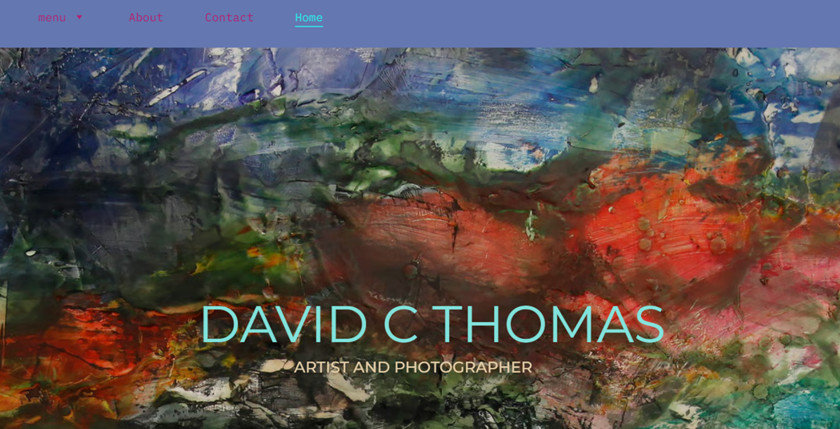
A minimalist resume website focuses on clarity and stops distractions. David C Thomas shows this approach perfectly. His site uses a simple grid layout where images and visuals that speak louder than long paragraphs of text. Instead of overwhelming visitors, it guides them straight to his skills and projects.
This kind of website design works best for professionals in corporate or tech roles, where recruiters value speed and efficiency. The clean look makes it easy to scan through details, while the straightforward navigation ensures no time is wasted searching for information.
Key Features:
- A clean layout makes your resume easier to read.
- Limited text helps recruiters focus on your skills.
- Simple navigation saves time and improves user experience.
CV Website Example
Example: Swapnil Ogale
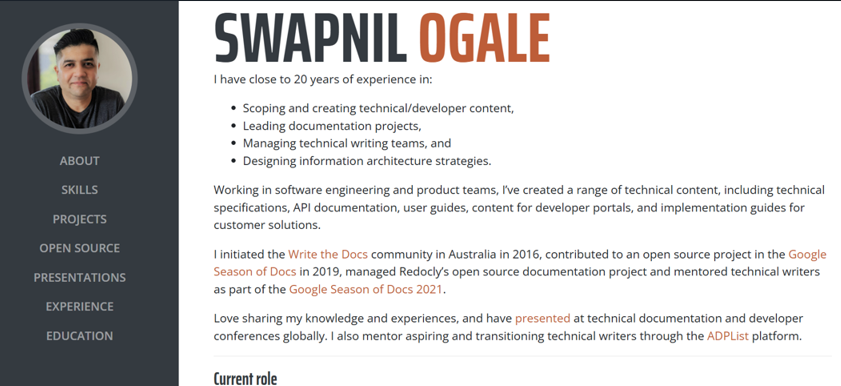
This is a personal site, reflecting the owner’s technical writing experience in Australia. It includes detailed sections such as his role at Amazon Web Services (AWS), documentation leadership, and the range of tools he uses for API content and developer portals. The site is well-structured, professional, and clearly highlights his skills in a format that serves both resume and portfolio purposes.
This type of website is best for technical writers targeting enterprise or developer-focused roles in fields such as cloud computing, software engineering, or technical documentation.
Key Features:
- Clearly shows work experience and current role (AWS Australia).
- Highlights expertise in content design, information architecture, UX writing, and developer documentation.
- Structurally well organized, making it easy for recruiters to follow your career path and expertise.
Portfolio-Heavy Resume Website Example
Example: Caroline Li
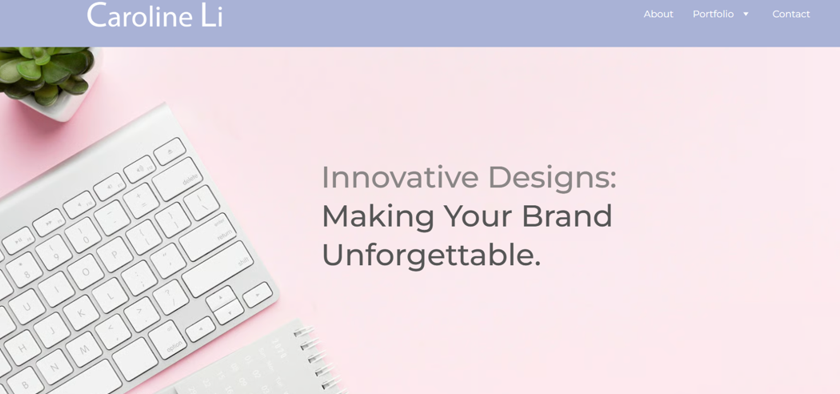
A portfolio-heavy resume website is perfect for showing both your experience and your work samples in one place. Caroline Li does this by combining her resume with a full portfolio of projects.
Her site uses dropdown menus that allow visitors to explore case studies and design examples without cluttering the main page. This makes it easy for potential employers to see her skills in action, not only read about them.
This style works best for designers, photographers, and artists who need to prove their creative abilities visually. Instead of relying only on words, the portfolio speaks for itself and gives recruiters confidence in the quality of work.
Key Features:
- Combine your resume with a strong visual portfolio.
- Dropdown menus or galleries make browsing simple.
- Showing real projects builds trust faster than text alone.
Interactive Resume Website
Example: Victor Marin
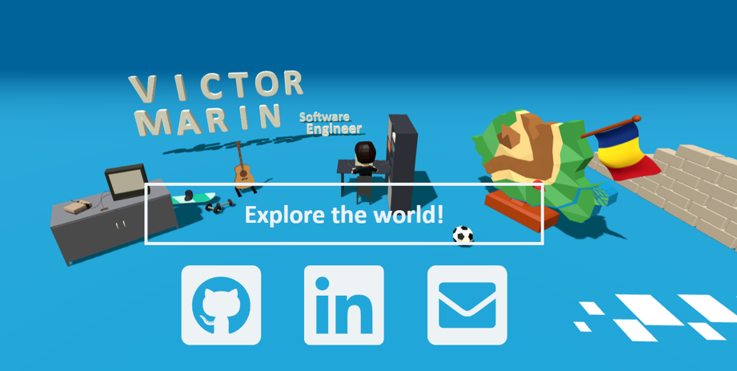
This site delivers an interactive experience that feels alive. Built with Three.js, the site uses 3D elements and animations so visitors can explore who the owner is, what he does, and how to get in touch, all in a scrollable, immersive interface. It moves beyond traditional design by blending personal expression with interactive tech for a memorable visit.
This style works especially well for developers, UX professionals, and digital creatives who want a balance between creativity and clarity. It demonstrates technical skill in a professional, easy-to-follow way.
Key Takeaways:
- 3D and animations make your resume site unforgettable.
- Interactive navigation keeps users engaged longer.
- Shows off both your technical skills and creative flair.
Storytelling Resume Website
Example: Tony D’Orio
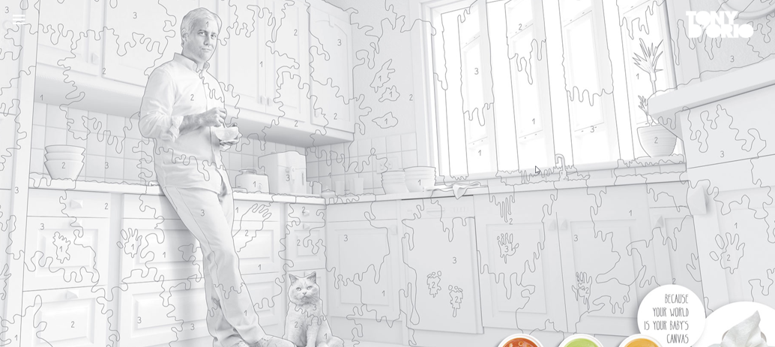
A storytelling resume website uses design and content to guide visitors through a career journey. This photographer does this successfully by combining text, visuals, and narrative to take users along his creative path. Each scroll reveals a new chapter of his work, blending personal insights with professional milestones.
This style is a great fit for writers, marketers, and content creators who want to show growth over time. It highlights not only what you’ve achieved but also how you got there, giving potential employers or clients a stronger connection to your story.
Key Features:
- Storytelling design helps visitors connect with your career path.
- Combining words and visuals creates a memorable narrative.
- A scroll-based flow makes it easy to follow your journey step by step.
One-Page Resume Website Example
Example: Vicki McIntosh
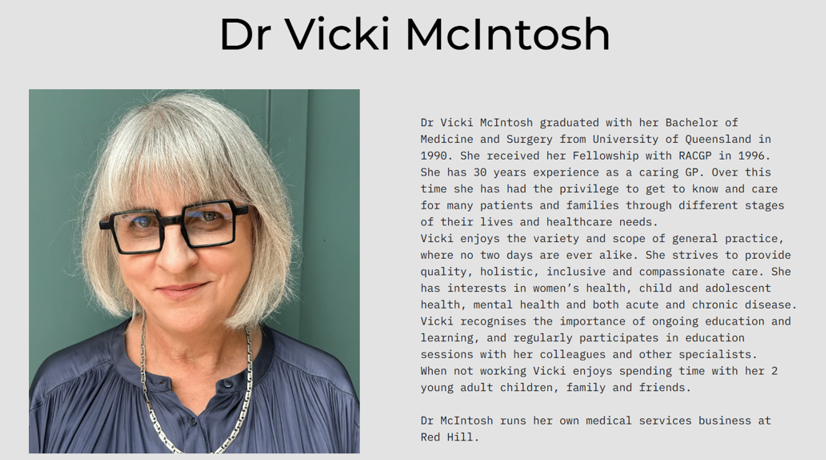
A one-page resume website keeps everything simple and direct. Vicki McIntosh uses this style to present her skills, work history, personal insights, and contact details on a single scrolling page. The design is compact, but complete, making it easy for recruiters to get a full picture without clicking through numerous sections.
This format works well for job seekers who want clarity and quick impact. It’s especially effective when you want busy employers to grasp your strengths in minutes. By keeping all details on one page, you avoid overwhelming visitors while still making a strong impression.
Key Features:
- One-page designs save time for recruiters and hiring managers.
- A scrolling layout keeps information easy to follow.
- Compact structure delivers impact without extra clicks.
Bold and Colorful Resume Website
Example: Roya Hamburger
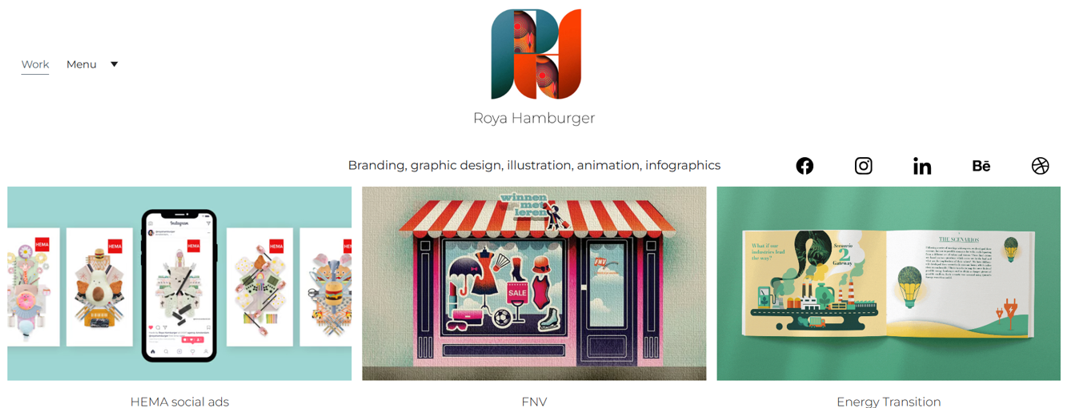
A bold and colorful resume website is all about making a strong first impression. This site shows this approach perfectly with vibrant colors, creative grid layouts, and smooth animations. The design immediately reflects the owner’s skills as a visual designer and makes the site memorable from the moment you open it.
This style works best for professionals in creative industries and branding experts. When design and creativity are part of your work, your resume website should reflect that energy.
Bright visuals, playful typography, and unique layouts help you stand out in a crowded field while showing confidence in your skills.
Key Features:
- Bold visuals can capture attention immediately.
- Creative grids and animations showcase design ability.
- Playful typography reflects personality and creativity.
Personal Brand Resume Website
Example: Matt Farley
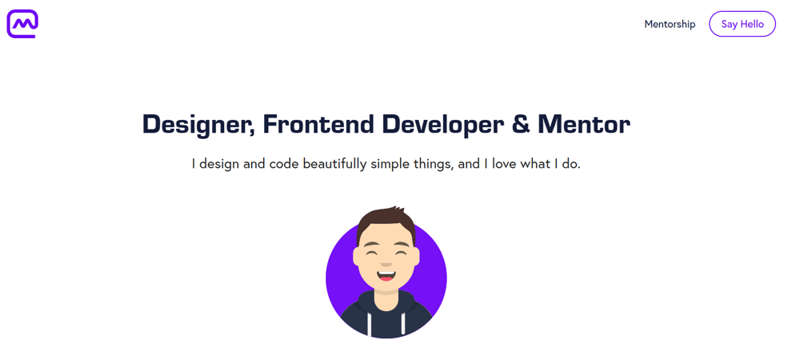
The site is a strong showcase of personal branding. Matt Farley uses his resume website not only to highlight his skills as a designer, front-end developer & mentor, but also to present himself as a brand.
The homepage introduces who he is, the services he offers, and links to his portfolio projects. The design is clean, approachable, and professional, which makes it easy for recruiters and clients to connect with him.
This type of resume website is ideal for freelancers and consultants who want to differentiate themselves from traditional resumes. By positioning the site around a personal brand, you’re not just sharing your experience; you’re showing your vision, style, and what it’s like to work with you.
Key Features:
- Personal brand websites highlight both services and personality.
- Clean layouts make the site professional and easy to explore.
- Positioning yourself as a brand attracts clients and employers.
How to Create Your Own Resume Website with Hosted.com®
So far, we’ve reviewed various resume website examples. Let’s understand how you can create your own with Hosted.com®:
- Login to your Hosted.com® account.
- Go to Manage Services → Website Builder.
- Choose your desired template. We provide 200+ pre-built templates you can customize as you wish. Ensure you preview on desktop and mobile, and then select the one that fits your style.
- Add your name, role, and headshot.
- Pick fonts and colors that match your personal brand.
- Upload a simple logo or initials if you have one.
- Build the core sections:
- Hero: Short headline, one-line summary, and two buttons: Download Resume and Contact Me.
- About: Three to four lines about who you help and how.
- Skills: Use tags or simple bars. Group hard and soft skills.
- Experience: Job title, company, dates, three bullet points for outcomes.
- Projects/Portfolio: Card grid with title, one-line outcome, and a “View case study” link.
- Testimonials: Add one to three short quotes with names and roles.
- Contact: Form with name, email, and message. Add your email and LinkedIn profile link.
- Add media correctly. Use JPG or WebP for photos; keep each image under 200-300KB. Write short alt text for every image to help SEO and accessibility.
- Simplify navigation. Keep a top menu with four to six items max: Home, About, Skills, Projects, Contact. Add a sticky header if the template supports it.
- Set page-level SEO. For each page, fill in Title and Meta description in the builder.
- Use short URLs: /about, /projects, /contact.
- Buy a new domain or connect one you own.
- Turn on a DV SSL certificate, then force HTTPSto secure the site.
- Check every page on mobile preview. Keep text lines short and buttons large enough to tap. Compress big images; enable any caching or CDN options the builder provides.
- Send form emails to your custom email address. Add spam protection (CAPTCHA or honeypot) if available. Test the form and confirm you receive the message.
- Add Google Analytics 4 to track key actions, such as resume downloads, contact submissions, project clicks.
- Click Publish. Test on real devices: open every link, submit the form, and download the PDF resume. Fix any typos, spacing issues, or broken links.
- Keep it fresh. Update projects, skills, and roles as they change. Add new case studies with clear outcomes. Back up your site to avoid any issues later.
![Hosted.com®’s Website Builder lets you design and publish a site that stands out. [Get Started]](webp/resume-website-examples-03-1024x229.webp "Hosted.com®’s Website Builder lets you design and publish a site that stands out. [Get Started]")
Find the Perfect Domain Name – AI Domain Name Generator
VIDEO: How to Find the Perfect Domain Name – AI Domain Name Generator
FAQS
What should I include on a resume website?
Your resume website should cover the basics: An about section, skills, work experience, portfolio or projects, and a clear contact option. Adding testimonials, downloadable resumes, and links to social profiles can make it even stronger.
Do I need coding skills to build a resume website?
No, you don’t. With our website builder or platforms like WordPress, you can create a professional resume site without writing code. Most tools offer ready-made templates you can customize easily.
How is a resume website different from LinkedIn?
LinkedIn is useful, but it limits how you present your profile. A resume website gives you full control over design, layout, and branding. You can add visuals, interactive features, and custom sections that LinkedIn doesn’t allow.
Can a resume website help me get more job offers?
Yes. A resume website improves your online presence, makes you more searchable, and shows employers that you’re serious about your career. It helps recruiters learn more about you before an interview, which can increase your chances.
How do I make my resume website mobile-friendly?
Choose a responsive template that adjusts to all screen sizes. Keep text short, use large buttons, and test the site on both phones and tablets to ensure it’s easy to read and navigate.
Other Blogs of Interest
– How To Create A Personal Website: A Beginner Guide
– Giving AI Access To Your Personal Data: The Risks Of Agentic AI
– Personal Website Examples with Unique And Effective Designs
– How To Secure A Website: Best Practices For Online Safety
– How to Make Your Website Mobile Friendly: 5 Essential Tips
- About the Author
- Latest Posts

Chantél Venter is a creative writer, strategic thinker, and a serious gesticulator. She’s passionate about storytelling, small businesses and bringing color to the world – be it through her words or wardrobe.
She holds a four-year degree in Business and Mass Media Communication and Journalism. She’s been a copywriter and editor for the technology, insurance and architecture industries since 2007 and believes anybody can run a small business successfully. She therefore enjoys finding and sharing the best and most practical tips for this purpose.