Contact Support
 Sign In
How to install Wildcard SSL certificate that allows you to secure your main domain as well as all its subdomains with a single certificate. This is ideal for WordPress sites hosted with Hosted.com® that have multiple subdomains, such as blog.yourdomain.com or shop.yourdomain.com. Installing a Wildcard SSL ensures that all your subdomains are encrypted and protected, improving security and visitor trust.
VIDEO: How to Install an SSL Certificate on Your Website
TABLE OF CONTENTS
What is a Wildcard SSL Certificate?
A Wildcard SSL certificate is a type of SSL that covers a domain and all its first-level subdomains. For example, a certificate issued for *.yourdomain.com will secure yourdomain.com, blog.yourdomain.com, shop.yourdomain.com, and any other subdomains you create in the future. This eliminates the need to install separate SSL certificates for each subdomain individually.
How to Install Wildcard SSL Certificate
1. Login to Your Hosted.com® Account
2. Go to the Manage Services drop-down section and click SSL Certificates.
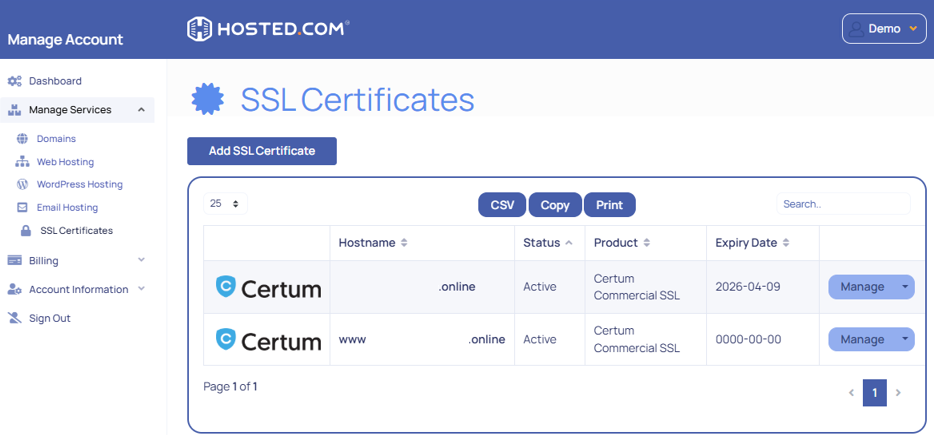
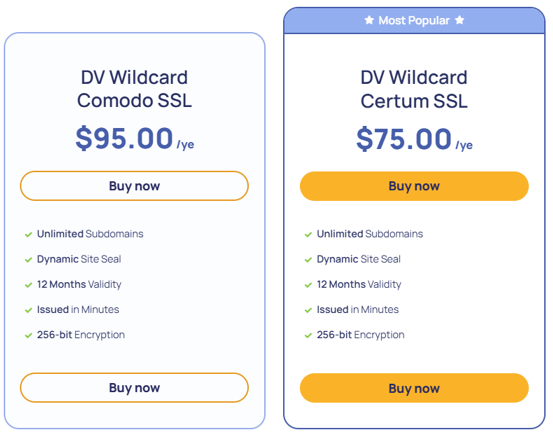
3. Scroll through the options and select the Wildcard SSL Certificate most applicable to your website.
4. The system will automatically generate and install the SSL certificate for your domain.
5. Once installed, your site and its subdomains will be accessible via https:// and the green padlock icon will appear in the browser.
DISCLAIMER: Any pricing reflected on images is for demonstration/reference purposes only and may not display current pricing – please refer to the Hosted.com® website.
Additional Information
- All Subdomains Are Secured: Protects all current and future subdomains without additional certificates.
- Visitor Trust: Displays the padlock in browsers for all subdomains, improving credibility.
- SEO Benefits: HTTPS improves search engine ranking and indexing.
- Simplified Management: One certificate to manage, instead of multiple certificates for each subdomain.
- Mixed Content: After installation, check that all website resources (images, scripts, CSS) are loaded via HTTPS to avoid mixed content warnings.
- Subdomain Management: Wildcard SSL automatically covers all first-level subdomains, but additional subdomains on different levels may require separate certificates.
- Backup: Keep a copy of your certificate files (CRT, KEY, CABUNDLE) for future installations or reconfigurations.
- Troubleshooting: If the SSL fails to install, confirm that your domain points to Hosted.com® nameservers and that no previous conflicting certificates exist. Contact Hosted.com® support for assistance if needed.
- Security Tip: Regularly verify your SSL installation and renew before expiration to maintain secure connections for all subdomains.