Contact Support
 Sign In
Our cPanel and WordPress Hosting Linux servers support the latest PHP version and a range of older versions to ensure compatibility with various applications and scripts.
TABLE OF CONTENTS
Supported PHP Versions
We support these PHP versions on our cPanel Web and WordPress Hosting plans:
- PHP V7.4
- PHP V8.0
- PHP V8.1
- PHP V8.2
- PHP V8.3
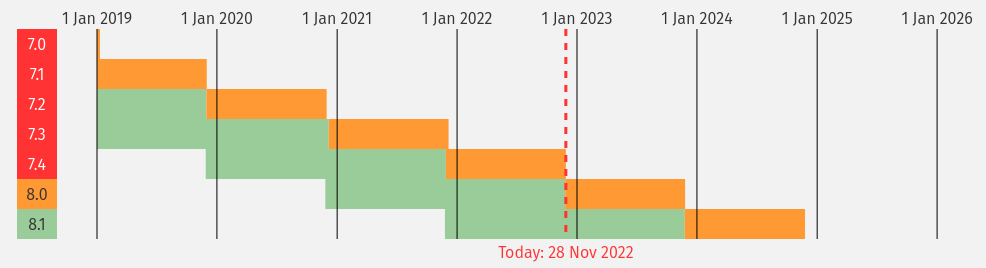
Even older PHP versions may continue to receive security updates for a time after their main development ends. This ensures that websites operating on them remain protected against known vulnerabilities. However, using a supported version for functionality and security is always advisable.
However, it’s important to note that if you are running older versions, some of them are no longer supported by php.net and may not receive security updates.
Current Recommendations
While we support older versions for legacy applications, it is recommended to use more recent updates for better security and performance:
- Check Compatibility: Ensure your website or application supports the latest versions.
- Update Applications: Update your site’s plugins, themes, and core software.
- Test Before Upgrading: Always test your site on a staging environment before upgrading production environments.
For users who require more control over their server environment or need different PHP versions not listed here, please contact our Support Team for more assistance.
Troubleshooting Common Issues with Older PHP Versions
If you encounter issues with older PHP versions:
- Verify Server Configuration: Use tools like WHM’s MultiPHP Manager to check the current version being used.
- Update Scripts: Ensure all scripts are compatible with the latest supported version.
- Contact Support: Reach out if you need assistance upgrading or troubleshooting specific issues related to outdated PHP versions.
Additional Information
Benefits of Upgrading PHP Versions
PHP (Hypertext Preprocessor) is a widely used open-source scripting language, especially prevalent in web development. It is embedded within HTML and is responsible for dynamic website content, including processing user input, interacting with databases, and generating web pages in real time.
PHP is known for its versatility, ease of use, and extensive community support, making it a preferred choice for site creation.
Upgrading to a newer release of PHP often includes optimizations that can lead to faster execution of PHP code, reduced memory usage, and improved server response times performance. It can also allow you to use newer technologies like HTTP/2, which can improve page speeds.
Having an older version of PHP may contain known security vulnerabilities that hackers can exploit. Upgrading to the latest version patches these vulnerabilities, making your website more secure.
Similarly, old versions eventually reach their end-of-life. This means they no longer receive security updates, making them increasingly vulnerable.
PHP and WordPress
Upgrading PHP generally benefits WordPress websites, leading to performance gains, security enhancements, and better compatibility. As of February 19, 2025, PHP 8.4 is the latest stable release.
Regarding WordPress websites, newer versions of WordPress are often designed to take advantage of the features and performance improvements in newer PHP versions. Upgrading PHP ensures compatibility and allows you to use the latest WordPress core software features without issues.
Additionally, newer or updated plugins or themes might not be compatible with older versions of the PHP language. This can lead to errors or broken functionality. Always thoroughly test your WordPress site in a staging environment before upgrading.
Using Multi-PHP Manager
If you have multiple sites requiring different PHP versions:
- Access Multi-PHP Manager through WHM (Web Host Manager).
- Select the domain(s) needing a specific version.
- Choose from available options (e.g., switch between supported versions).
Best Practices for Developers
When developing new projects or updating existing ones:
- Use Modern Frameworks: Leverage frameworks that support newer PHP updates.
- Test Thoroughly: Ensure compatibility across different environments before deployment.
- Monitor Updates: Stay informed about upcoming end-of-life dates for currently used PHP versions.